Practical guide · US consumer prices
Read US monthly price changes with a CPI chart
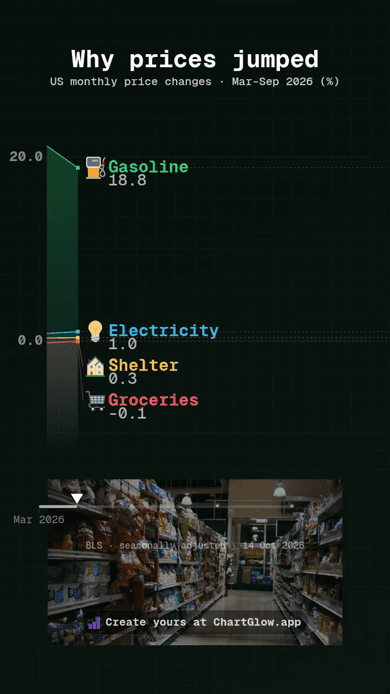
Reuse the complete portrait Line project, then compare seven months of price changes for four US categories. No file import is needed.
1. Start with the complete project
Open the complete CPI project and choose Use this project. Your separate copy keeps the native Line chart, four category pictograms, supermarket background and portrait composition. Sign in if asked, then return to the same project and choose its Use button.
Customize the title or styling, preview your changes and wait for Saved before reloading. Check the title, months, units and values at phone size. Keep the source credit and let moving labels settle between monthly points.
For a fresh style, the CPI dataset provides the same data in a native Line starter. Its CSV download is optional; you do not need to import a file or rebuild the composition. Both paths preserve your existing work. Free accounts allow 5 saved projects; Free exports keep the ChartGlow watermark.
2. Read changes, not price levels
The 28 observations cover seven months, March–September 2026, for Gasoline (all types), Groceries (BLS food at home), Electricity and Shelter. Each value is a seasonally adjusted percentage change from the preceding month. Seasonal adjustment accounts for recurring seasonal patterns; it does not turn these rates into annual inflation.
A negative rate means that category’s index fell from the previous month. A positive rate that becomes smaller still means a rise, at a slower monthly pace. Zero means no change at the published precision. These rates do not show dollar prices or which category is more expensive.
These are four selected categories, not the full consumer basket. Do not add categories or monthly rates together, and keep Cumulative Sum OFF. The chart does not show cumulative price growth or the 12-month headline inflation rate. Its curves describe the published changes; they do not establish why prices moved.
Between monthly points, movement is visual interpolation, not extra observations. The Date field identifies the reporting month, not a daily measurement. The existing mapping is Category → Entity, Date → Time, Change → Value and Image → Series Image.
3. Keep the source and credits
- Data: US Bureau of Labor Statistics, September 2026 CPI release, 14 October 2026, Table A. This saved release snapshot is not a live feed; later seasonal revisions may differ. See the BLS archived supplemental tables.
- Background: Alanthebox, Potato Chip Aisle, 15 September 2011, CC0 1.0. This historical North American supermarket photo is illustrative, not a 2026 BLS observation.
- Separate category pictograms: gas pump, shopping cart, light bulb and house by Twemoji contributors, CC BY 4.0. Symbolic illustrations; no endorsement implied. Retain the saved source and image-rights record.

To make your own video, use the editor’s Export button and follow the MP4 export guide. You can also watch the existing CPI MP4 without creating another chart.